
STUDENTS

arnold on Mar 03, 2019
***Updated 4/26/2026***
Local Search Marketing:
When planning a digital marketing strategy, it is important to consider local search marketing.
Most companies focus on the organic results, which is the biggest component of the search engine results page. However, if your business has a storefront or physical location, then the local search results need to be a top priority for your strategy.
Local search results are search results from Google for brick and mortar businesses that have a storefront or physical location in order to serve their customers in person. Local search results typically appear when people search for businesses and places near their location. You can see local results in the image below.

Local search results are very important for storefront businesses because they appear before the organic results. Most people looking for a local business will look for it in the local search results rather than going to the organic results.
In order to have a better chance of coming up in the local search results, businesses need to do a couple things. We are going to discuss briefly how we can appear and climb to the top of Local search results.
1) Claim Google My Business Listing
The first thing you should do as a business owner is to claim and verify your listing in Google. This will make sure that your business is listed correctly and that you’re able to manage your listing.
***If you are my in my Digital Marketing Class, skip this step***
https://www.google.com/business
Once you get signed in, perform a search for your business. If it has been around for a while Google will have a record of it. If it is brand new, then you will enter the information about the business. Either way, Google will mail a card to the business address that has a code on it. Use this code to verify that you are in fact the owner of the address and that you do have a physical storefront.
2) Completely Update Your Google My Business Listing
Make sure all the information in your listing is filled out. Use relevant keywords in your business name, address, and phone number (NAP). Google will always suggest the most relevant business in the local search results. If you only provide partial information then Google will not present your business in the local search results. It isn’t an overwhelming task, so make sure you enter every piece of information that Google asks for and take the time to upload nice photos into your listing
Here is a screenshot from inside a Google My Business account:

3) Things that a business owner can do on a weekly basis in their Google Business Profile to rank higher in Google Maps:
- Keep your information up-to-date. Make sure that your business information is up-to-date, including your name, address, phone number, hours of operation, and website.
- Add photos and videos. Photos and videos can help to make your listing more visually appealing and informative. Be sure to add high-quality photos and videos that show off your business and its products or services.
- Get reviews. Positive reviews from customers can help to improve your ranking in Google Maps. Encourage your customers to leave reviews on your listing.
- Post regularly. You can post updates, photos, and videos to your Google Business Profile to keep your customers engaged. This can also help to improve your ranking in Google Maps.
- Respond to reviews. When customers leave reviews, be sure to respond promptly and professionally. This shows that you care about your customers and their feedback.
- Promote your listing. Share your Google Business Profile link on your website, social media, and other marketing materials. This will help to drive more traffic to your listing.
By following these tips, you can improve your Google Business Profile and rank higher in Google Maps. This can help you to attract more customers and grow your business.
4) Citations and NAP-W consistency
With organic search engine optimization we were concerned with links back to our website. With local search marketing we are concerned with what is called citations. A local citation is any mention of your business in a web directory and is any combination of your company name, address, phone number (NAP) and website address. Citations are a key factor in improving your local search results.
To keep it simple, we are most concerned with structured citations which come from business listing directories. With sites such as YELP, Yellowpages, Facebook, Superpages, Mapquest, etc., we can enter our information to get us a citation.
Here is an example of a structured citation:

The only Caveat with this is that you must keep your business name, address, phone number and website exactly the same everywhere it is posted. If your address has a suite number and you have 5 citations using SUITE in the address and 5 citation that use STE., then you only are only getting 5 citations.
This is generally referred to as NAP consistency. You must decide on the exact NAP information for your business and make sure it is always presented that way online and offline, 100% of the time.
You will need to do searches for your business and make sure all available information is NAP consistent. There are tools that help us with, which we will preview below. Additionally, you need to make sure there are no duplicate citations in directories as these become troublesome for Google in recognizing your business.
Listed below are the 10 biggest directory websites you should be concerned with on day one. When working on local search marketing it is common to seek out and find hundreds of directories to update your information. This can obviously take a lot of time.
-
- Acxiom
- Apple Maps
- Bing
- Citygrid
- Factual
- Foursquare
- Infogroup/ExpressUpdate
- Localeze
- Superpages
- Yahoo!*
- YP
- Yelp
5) Local search marketing tool:
Two tools we can use to help check our local search marketing efforts are Moz Local Listings Score and the Yext Citation Scan Tool.
Moz Local Citation Checker
The Moz Local Citation Checker scans a business’s name, address, and phone number across major directories and reports where that information is complete, missing, or inconsistent.
Since citations play a major role in helping Google confirm that a business is legitimate and located where it claims to be, inaccurate listings can hold back local search performance.
This tool gives you a clear overview of your citation health and highlights the specific directories that need attention.
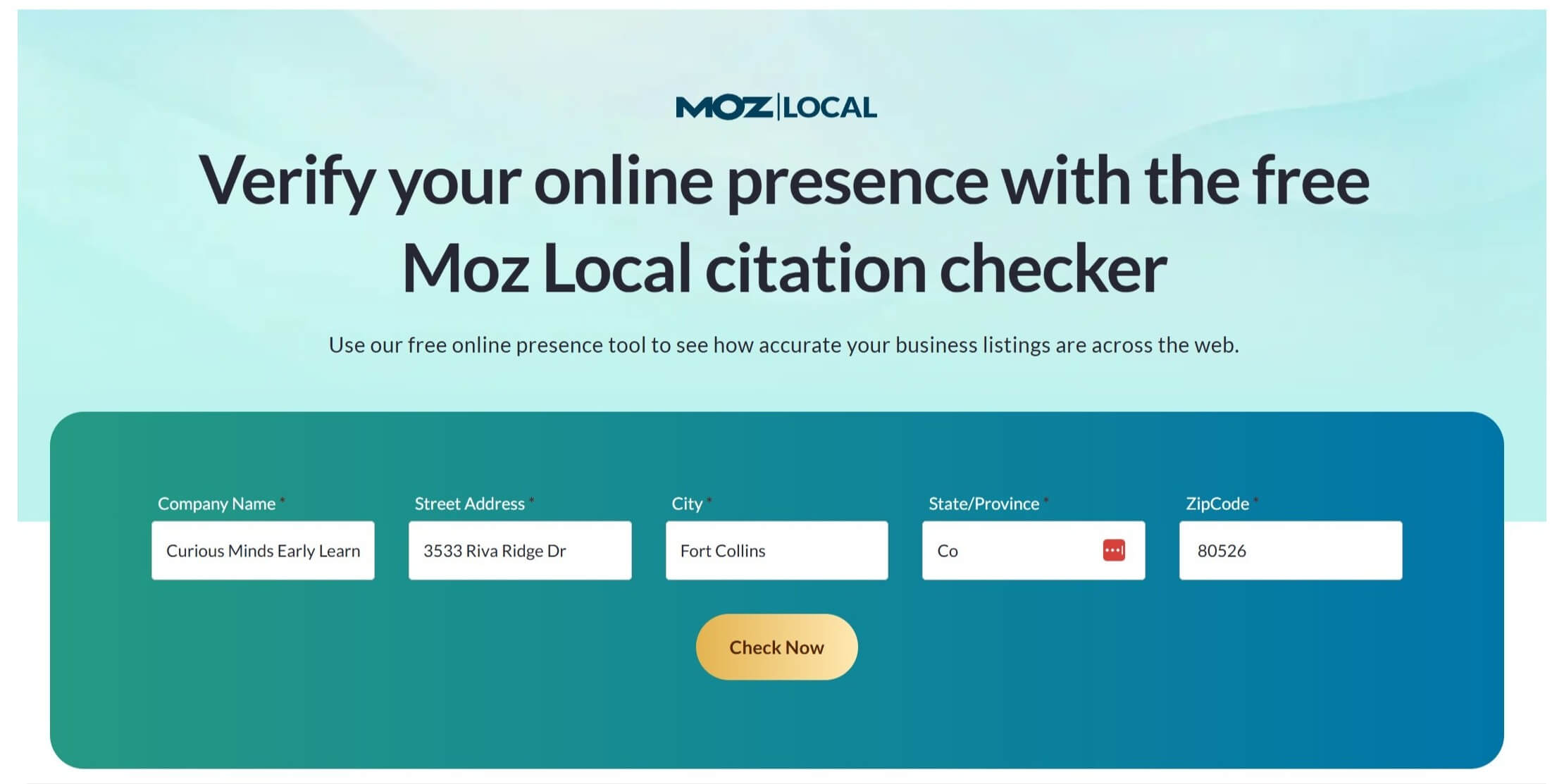
To get started, go to the Moz Local Citation Checker . Then enter the business information, and review the results. See the screenshot below, which shows the initial setup screen.
This screenshot below shows the results of a Moz Local citation scan using Curious Minds Early Learning Center as the example business. Moz gives the business an immediate overview score: 80% of its listings are missing, 20% are incomplete, and none of its listings are fully correct. The pie chart on the right reflects this distribution visually, making it easy to see how much work needs to be done before the business has strong citation coverage.
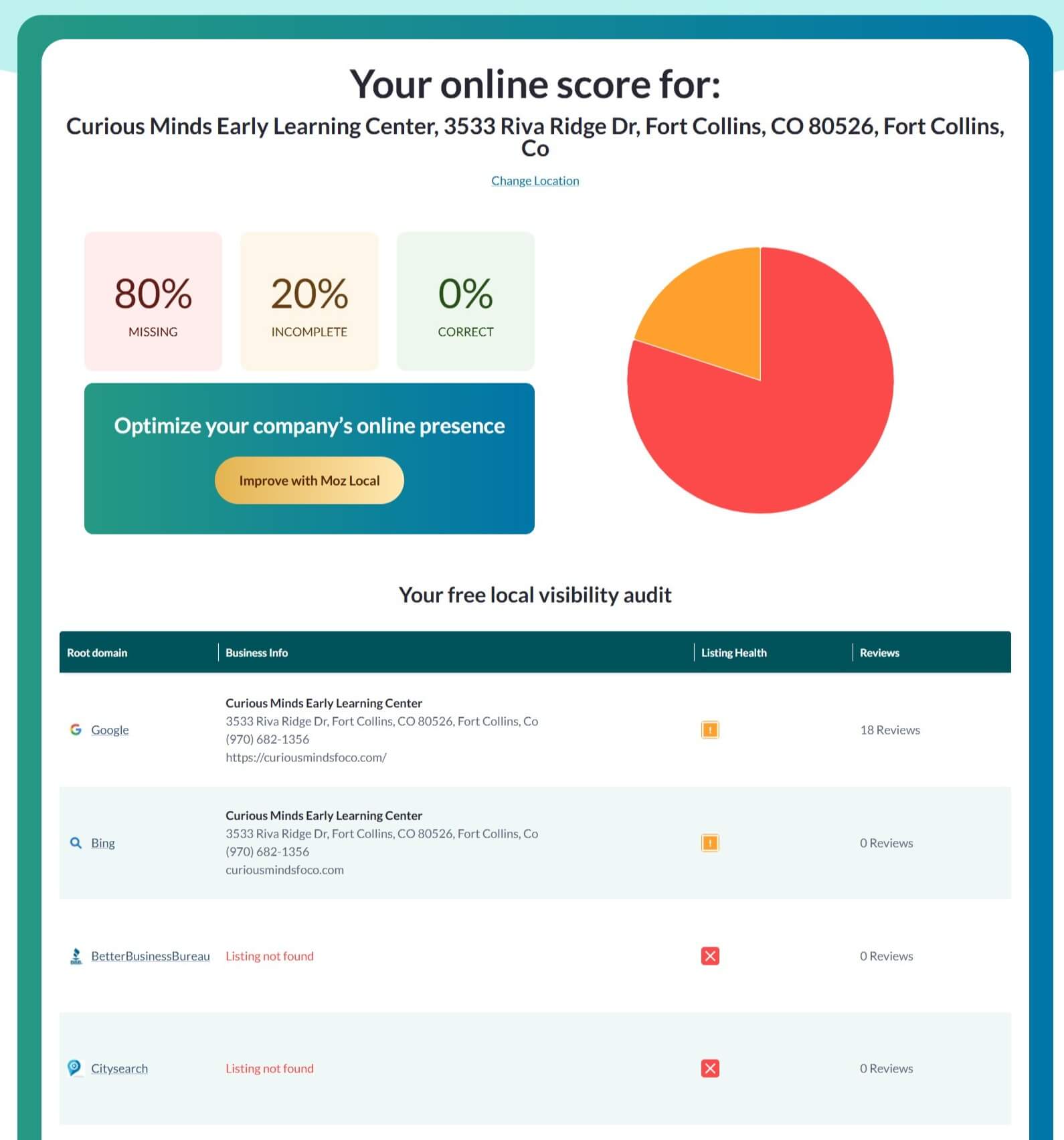
Below the score, Moz lists each directory it checked. Google and Bing both show partial listings for Curious Minds Early Learning Center, and each of these directories has the correct address and phone number displayed but is marked as incomplete. Google shows 18 reviews, while Bing shows zero. The next two directories shown—Better Business Bureau and Citysearch—both return “Listing not found,” which means the business does not appear in those directories at all.
Students should look for three key things here. First, whether the business appears in each directory. Second, whether the information displayed matches the business’s exact name, address, and phone number. And third, whether the directory shows the listing as healthy, incomplete, or missing. These indicators help determine where citation corrections or new listings need to be added in order to strengthen the business’s overall local search presence.
Yext Citation Scan Tool
The Yext Citation Scan Tool is the second option you can use to evaluate a business’s presence across major directories. It works in a similar way to Moz but pulls data from a slightly different group of platforms, which helps you create a more complete picture of how a business appears across the local search ecosystem. Yext checks the business name, address, phone number, and website on more than 40 major sites, including Google, Yelp, Facebook, Bing, Yahoo, MapQuest, and others. After you enter the basic details, the tool will show whether the business is listed, missing, or inconsistent on each platform.
For this walkthrough, we’ll use JAX as the example again. In the screenshot below, you can see the starting screen where you select the type of business and enter the business name and phone number. Once the information is submitted, Yext generates a detailed report showing which listings need attention and where the business may be losing visibility due to incorrect or missing citations.
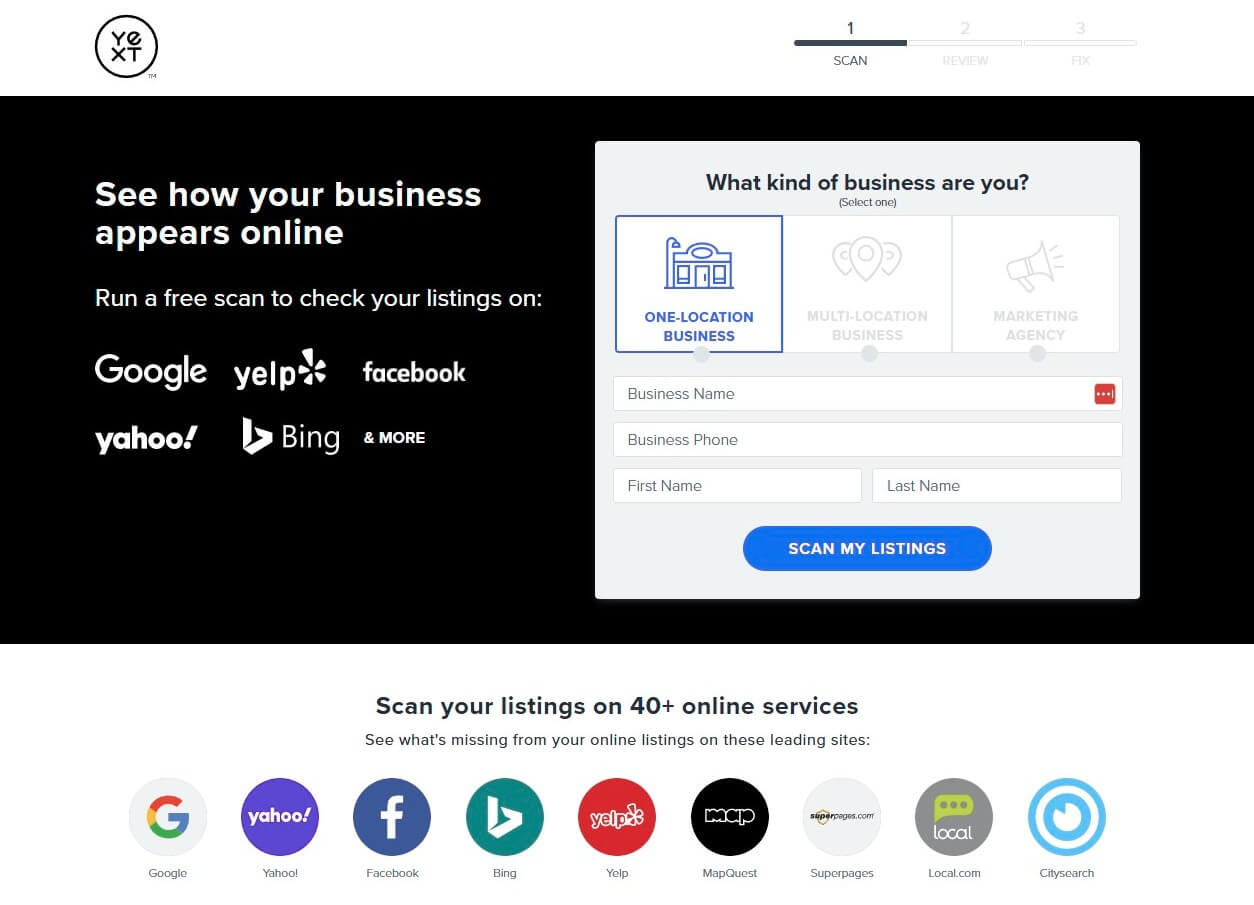
This will give you an analysis of the top 60 directories and show you missing listings or inconsistent listings.

You can use the Yext report to manually correct any listings that are missing or inaccurate, or you can have Yext handle the updates for you. If you choose their service, they offer a one-time citation cleanup package that typically costs around $350.
Geo-Grid Rank Tracking (Visualizing the “Truth”)
Now that we know if the business’s data is consistent across the web, let’s use a Geo-Grid tool to see exactly where that data is (or isn’t) helping the business rank on a street-by-street level.
The citation checkers above tell us if our data is correct, but the Geo-Grid Rank Tracker shows us the actual result of those efforts on a map.
Traditional rank trackers are often misleading because they only give you one ranking number for an entire city. In reality, local rankings change block-by-block based on where the searcher is standing. A geo-grid tool allows us to see this “proximity effect” in action by simulating searches from dozens of different points across a neighborhood.
Here is the tool I used: GTrack
For this walkthrough, I used GTrack (by Wiremo). It is a powerful local rank tracker that provides 500 free scan credits with no credit card required—perfect for students.
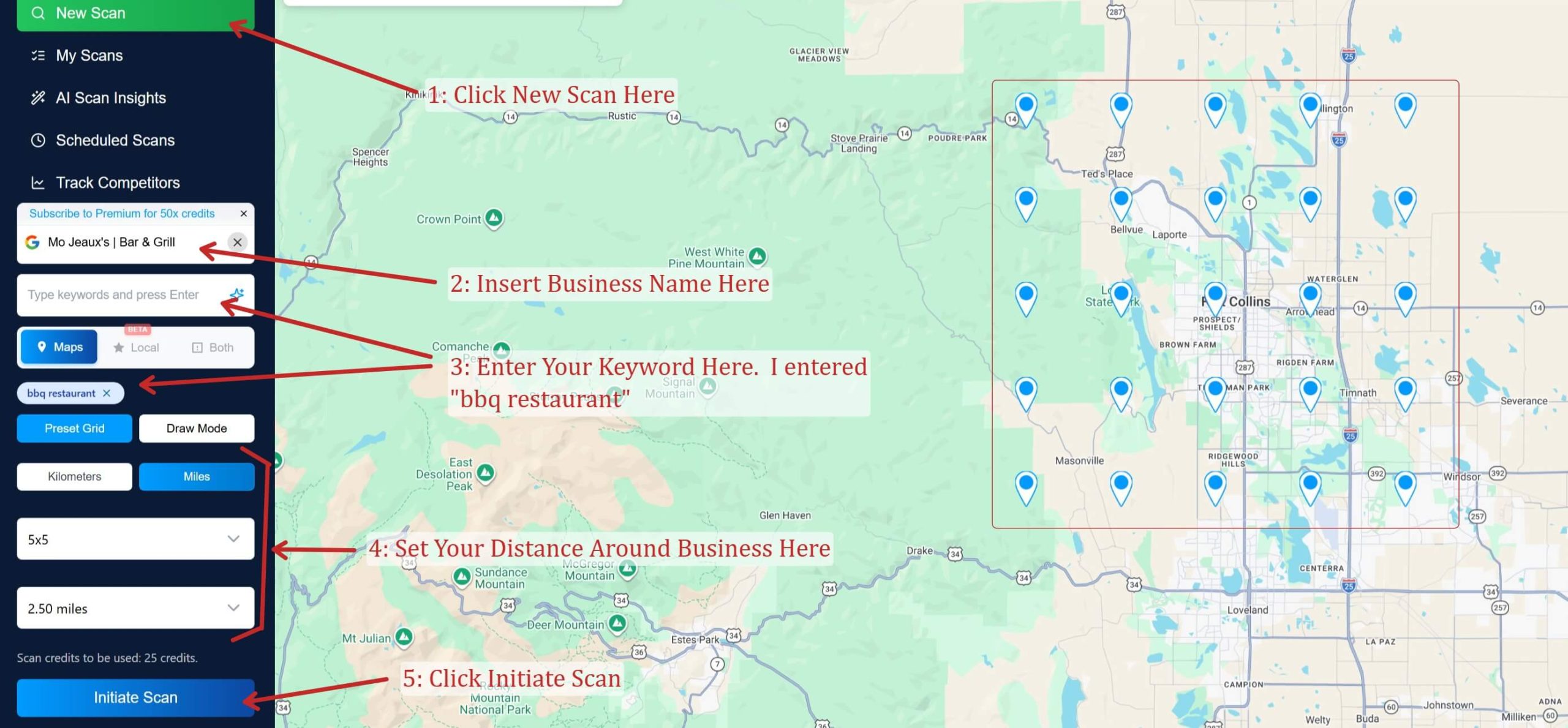
Here are the steps I took to set it up:
-
Insert Business Name: I searched for “Mo Jeaux’s | Bar & Grill.” The tool matches the name to the official Google Business Profile.
-
Enter Keyword: I entered the keyword “bbq restaurant” to see how they rank for that specific food category.
-
Set Your Distance: I set a 2.50-mile radius around the business to see how far their visibility reaches into the surrounding Fort Collins neighborhoods.
-
Configure the Grid: I chose a 5×5 grid, which places 25 “virtual searchers” on the map to test the rankings.
-
Click Initiate Scan: The tool then runs the check from all 25 points at once.
Here is what it means in the screenshot:
Once the scan finishes, you get a color-coded heatmap of the results:
-
The Pins and Numbers: Each pin represents a GPS coordinate. The number inside is the business’s rank. A “1” means they are the top result, while a “7” means they are buried below six competitors.
-
Green (1-3): These are the only areas where the business is appearing in the “Local Pack” (the top 3 results) that get most of the clicks.
-
Orange (6-15): The business is relevant, but effectively invisible because users would have to scroll to find them.
-
ARP (Average Rank Position): In the screenshot, Mo Jeaux’s has an average rank of 8.2. This tells us that across the neighborhood, they are failing to reach a top-3 spot.
-
The Proximity Bubble: Notice how the rankings are green right at the business’s front door but turn orange just half a mile away. This visually proves that while their Proximity is good, they lack the Prominence needed to outrank competitors who are further away.
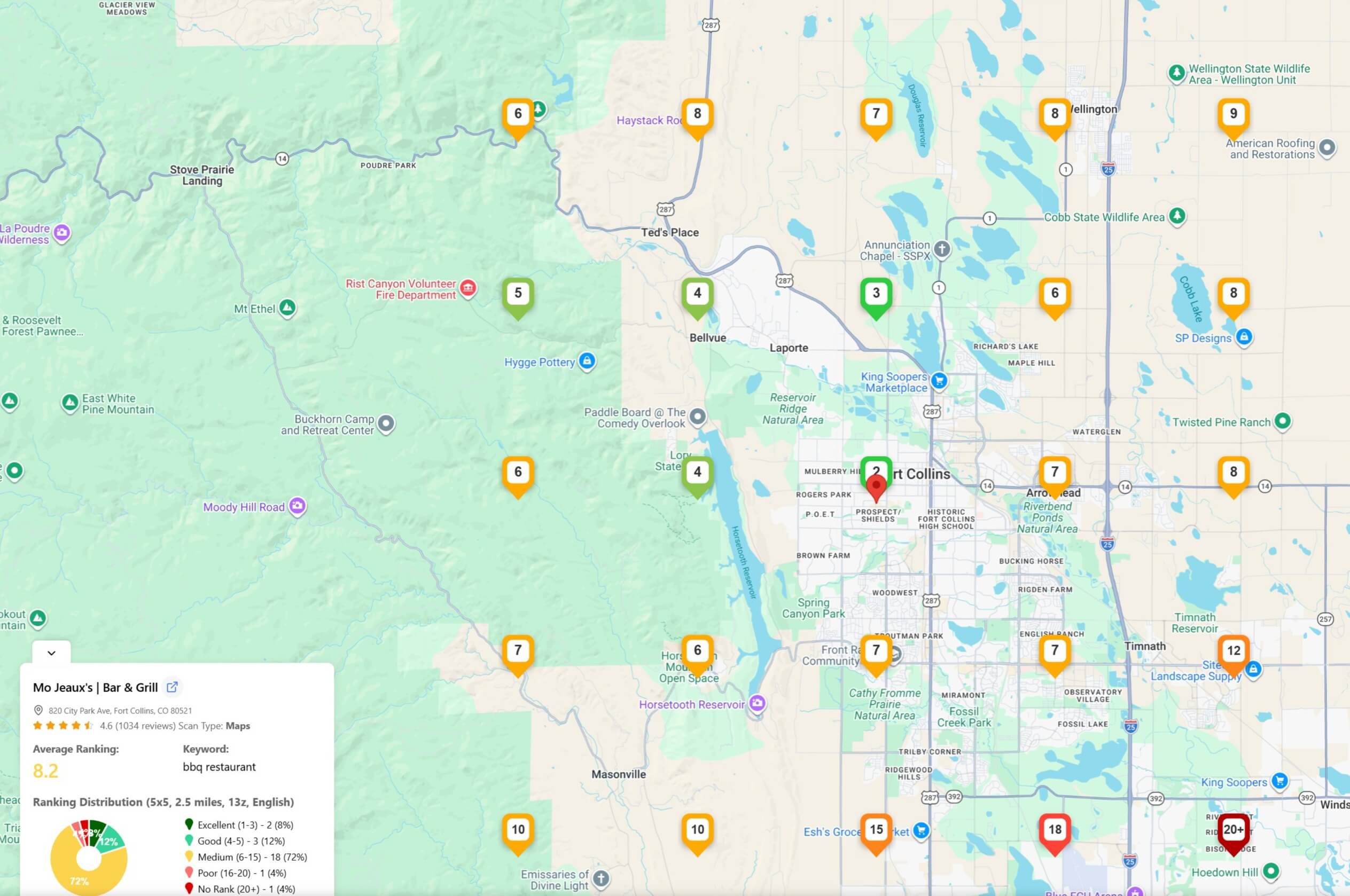
Based on this data, here are a few things that Mojos could do to improve their ranking:
-
Targeted Review Velocity: Since their ranking drops to #7-#10 very quickly, they need more fresh reviews to increase their “Prominence” score. They should specifically encourage customers from the southern neighborhoods (where they are currently orange) to leave reviews.
-
Local Content: They should add content to their website that mentions local landmarks like Spring Canyon Park or the CSU Campus. This helps “stretch” their relevance bubble further south on the map.
-
Weekly Activity Signals: Mojos should post on their profile weekly. Profiles with active updates signal to Google that they are operational and engaged, which can help push those orange pins into the green.
If you would like to learn a little more about local search marketing you can check out the following resources.
How To Improve Your Local Ranking According To Google:
Comprehensive List of Local Search Result Tools: